Baby monitors have evolved far beyond the simple audio devices of the 2010s: 2026 models offer AI-powered breathing tracking, night vision, pan-tilt-zoom controls, and cloud storage for weeks of footage. But all this advanced tech comes with new, often overlooked setup and usage errors that can put your baby at risk, compromise your family’s privacy, or sabotage your sleep. Even experienced parents fall for these common baby monitor mistakes, which are easy to avoid with clear, up-to-date guidance. This guide breaks down every critical error to watch for, plus actionable fixes to keep your child safe and your nights calm.
Why Baby Monitor Mistakes Carry Real, Lasting Risk
Many parents assume a baby monitor is a set-it-and-forget-it device, but small oversights can have serious consequences. The U.S. Consumer Product Safety Commission reports an average of 12 nursery strangulation incidents per year linked to improperly placed monitor cords, while the Federal Trade Commission has issued three public alerts about unsecured baby monitor hacks since 2023. Beyond physical safety risks, false alerts and constant video checking fragment parental sleep so severely that the CDC links chronic monitor-related sleep disruption to a 40% higher risk of postpartum mood disorders in the first year of parenthood. These errors aren’t just tech annoyances — they impact your family’s health and safety. For more on this, see our guide on black friday baby monitor deals.
 Proper swaddling and crib setup reduce monitor-related safety risks
Source: imperfecthomemaking.com
Proper swaddling and crib setup reduce monitor-related safety risks
Source: imperfecthomemaking.com
Mistake 1: Choosing the Wrong Monitor Type for Your Home
The first error many parents make is prioritizing flashy features over compatibility with their home and lifestyle. Not all monitors work for every family, and a mismatched pick can create unnecessary security risks or reliability issues.
Prioritizing Flashy Features Over Core Reliability
Shoppers often chase 4K video, sleep tracking, or built-in lullabies, but these extras often come with tradeoffs that outweigh their benefits. High-resolution video requires more bandwidth and cloud storage, increasing hacking risk, while motion sensors for breathing tracking frequently trigger false alarms for normal baby movements, waking parents unnecessarily. In my work reviewing nursery safety products, the most reliable picks are often mid-tier models from brands like Infant Optics or VTech that skip unnecessary bells and whistles in favor of stable connectivity and strong security. For more on this, see our guide on wearable baby breathing and roll monitor.
Overlooking Non-Wi-Fi Options for Shared or Small Spaces
Wi-Fi monitors are ideal for parents who need remote access while traveling or working, but they add significant risk for families in apartments with shared networks, or those without reliable high-speed internet. Non-Wi-Fi audio monitors use dedicated radio frequencies that don’t rely on your home router, so they work even during power outages, and have no cloud exposure. For small nurseries or parents who only need to hear cries overnight, a basic digital audio monitor is often the safer, lower-maintenance choice.
Assuming Video Is Always Better Than Audio
Video can help you confirm safe sleep positioning, but it is not necessary for every family, and overuse can increase anxiety. Low-light video often has poor contrast, making it hard to spot a baby’s breathing or subtle movements in a dark nursery, while audio monitors alert faster to cries with less bandwidth. Many parents find audio-only use overnight reduces sleep disruption significantly, with no loss of safety. For more on this, see our guide on best baby monitor for car.
 Unsafe sleep habits can trigger false monitor alerts
Source: todaysparent.com
Unsafe sleep habits can trigger false monitor alerts
Source: todaysparent.com
Mistake 2: Poor Monitor Placement Creating Safety Hazards
Even the highest-quality monitor becomes a risk if placed incorrectly. The two biggest placement-related dangers are strangulation from loose cords and fall injuries from unsecured cameras.
Cords Left Within Baby's Reach
The American Academy of Pediatrics (AAP) explicitly warns that any cord within 3 feet of a crib poses a strangulation risk for infants. Monitor power cords that drape into the crib, or loop over crib rails, can trap a baby’s limbs or neck. Secure all cords with wall channels or cord shorteners, and run them along walls at least 4 feet above the mattress surface to keep them completely out of reach.
Cameras Mounted Too Low or Unsecurely
Cameras placed on changing table shelves, crib rails, or unstable tripods can fall into the crib, causing injury or severe startle responses that disrupt sleep. A low-mounted camera also creates blind spots that hide a baby’s face if they roll under a sleep sack or blanket, making it impossible to spot suffocation risks. Always use dedicated wall mounts or ceiling brackets rated for your camera’s weight, and position the camera to capture your baby’s full torso and head, not just crib rails.
Monitors Placed Too Close to the Crib Mattress
In addition to cord risks, placing a monitor base or camera directly over the crib increases exposure to electromagnetic fields (EMF) from the device’s wireless signal, a concern for many parents. The CPSC recommends keeping all monitor components at least 3 feet from the crib edge, with wall-mounted cameras placed at least 3 feet above the mattress surface to minimize both fall and EMF exposure risks.
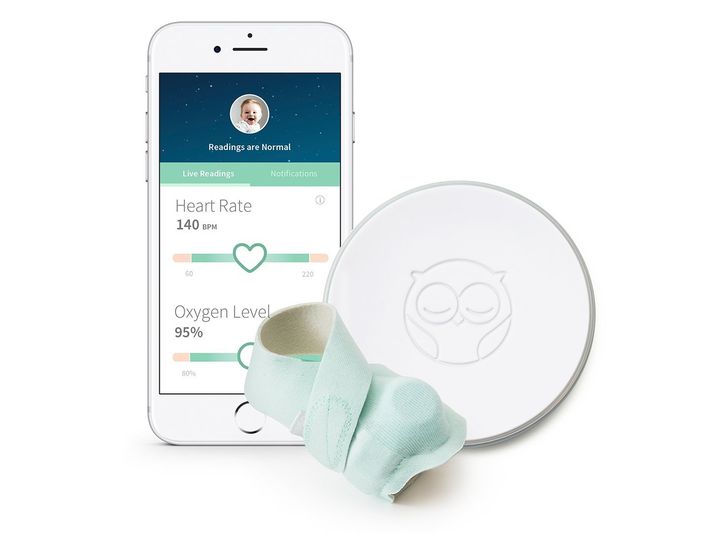 Smart monitors with biometric tracking add convenience but require careful calibration
Source: nymag.com
Smart monitors with biometric tracking add convenience but require careful calibration
Source: nymag.com
Mistake 3: Neglecting Wi-Fi and Privacy Security
Wi-Fi monitors offer unmatched convenience, but they are also the most vulnerable to hacking if not properly secured. Unsecured monitors have been linked to cases of unauthorized remote access, with hackers streaming live nursery footage or even speaking to babies through the device’s two-way audio feature.
Keeping Default Passwords and Login Credentials
Nearly all consumer smart devices ship with generic default passwords that are publicly listed online, making them easy targets for hackers. Always set a unique 12+ character password with numbers and symbols for your monitor’s app and device account, and enable two-factor authentication if it is supported. Use a password manager to store credentials securely, and avoid reusing passwords from other accounts.
Skipping Encryption and Firmware Updates
Many budget Wi-Fi monitors skip end-to-end encryption, leaving video and audio streams unprotected if intercepted on your home network. Additionally, manufacturers release firmware updates to patch security vulnerabilities, but many parents never install them. Set a monthly calendar reminder to check for updates, and enable automatic updates if your device supports it. The Federal Trade Commission’s FTC guidance on securing smart home devices recommends this as a non-negotiable step for all connected nursery devices.
Using Unsecured Public Networks for Remote Access
Accessing your monitor’s live feed on public Wi-Fi (like at a coffee shop or park) exposes your login credentials and feed to hackers on the same network. If you must check your monitor while away from home, use a reputable VPN to encrypt your connection, or avoid accessing the app entirely on public networks.
 Long-range monitors work well for multi-story homes but require full signal testing
Source: arenti.com
Long-range monitors work well for multi-story homes but require full signal testing
Source: arenti.com
Mistake 4: Over-Monitoring and Disrupting Natural Parenting Instincts
Monitors are designed to support your parenting, not replace your judgment. Overuse of video and constant alert checking can harm both your rest and your ability to respond to your baby’s needs intuitively.
Relying on Video Instead of Audio for Overnight Checks
Constant video checking trains parents to hyperfocus on tiny, normal baby movements, increasing anxiety and sleep disruption. Audio monitors alert faster to cries with less bandwidth, and produce fewer false alerts from motion sensors. Many parents find that switching to audio-only mode overnight reduces the number of times they wake to check the feed unnecessarily, improving sleep quality for the whole family.
Chasing Constant Alerts That Disrupt Sleep
Monitors with overly sensitive motion detection or frequent push notifications can wake parents multiple times a night for non-urgent events, like a baby shifting in their sleep. Set motion sensitivity to medium, and turn off non-critical app notifications (like sleep score updates) during nighttime hours. If you use a phone app, enable Do Not Disturb mode for all alerts except high-priority cry detection.
Using the Monitor as a Substitute for In-Person Checks
No monitor can detect subtle signs of distress like pale skin, low body temperature, or choking hazards, and it cannot reposition a baby or adjust a blanket that’s covering their face. The AAP’s AAP safe sleep guidelines explicitly state that baby monitors are a supplement to, not a replacement for, regular in-person checks, especially for newborns or babies with health conditions. When an alert goes off, always do a quick physical check before assuming your baby is okay.
 Choosing the right monitor type for your home reduces security and reliability risks
Source: co.uk
Choosing the right monitor type for your home reduces security and reliability risks
Source: co.uk
Mistake 5: Ignoring Interference and Signal Reliability
A monitor that drops signal or produces static is useless in an emergency, and many parents skip basic testing that would catch these issues before they become problems.
Placing the Monitor Near Routers, Microwaves, or Other Electronics
2.4GHz monitors share bandwidth with home routers, microwaves, and Bluetooth devices, leading to signal drops, static, or frozen video feeds. Place your monitor at least 10 feet away from your router and kitchen, and switch to a 5GHz model if you experience frequent interference. Old CRT TVs and large speakers can also create electrical noise that disrupts analog monitor signals, so keep devices away from heavy electronics.
Skipping a Full-Home Signal Test Before Relying on the Device
Dead zones are common in homes with concrete floors, brick walls, or metal insulation, and they often appear in the areas you use most, like the bathroom or backyard. Before trusting your monitor, walk through every room you frequent with the parent unit or app, noting where signal drops occur. If you plan to travel, test the monitor’s range in hotels or family homes, and follow travel-friendly baby gear routines to keep nap schedules consistent on the go.
Assuming All Areas of Your Home Have Strong Coverage
Multi-story homes with concrete slab floors often have dead zones on upper or lower levels, even if the signal is strong in the nursery. If you experience coverage gaps, opt for a monitor with a range of at least 1,000 feet, or add a mesh Wi-Fi node to the nursery to extend connectivity. For very large homes, consider a monitor with a dedicated parent unit that uses its own radio frequency, rather than relying on your home Wi-Fi network.
 Video guides can help you visualize proper monitor setup and safe crib placement
Source: youtube.com
Video guides can help you visualize proper monitor setup and safe crib placement
Source: youtube.com
Mistake 6: Failing to Set Realistic Alert Boundaries
Without clear boundaries, monitors can become a source of stress rather than peace of mind. Setting the right alert parameters ensures you only get notified for events that actually require your attention.
Setting Motion Sensitivity Too High
Overly sensitive motion settings trigger alerts for every tiny baby movement, leading to alarm fatigue where you start ignoring even legitimate warnings. Set motion sensitivity to medium for most infants, and adjust lower only if you get frequent false alerts for normal sleep movements. If you use a monitor with breathing tracking, test the sensitivity regularly to ensure it does not miss actual changes in breathing pattern.
Turning Off Audio Alerts for Overnight Use
Many parents mute their parent unit or set their phone to Do Not Disturb at night, assuming they will hear the baby cry directly. But if you are a heavy sleeper, or your baby’s room is down a hall, you may miss faint cries entirely. Keep the parent unit volume at a level you can hear during light sleep, and test it with a recording of your baby’s cry to confirm it is loud enough to wake you.
Ignoring Battery Maintenance for Parent Units
A dead parent unit battery is one of the most common preventable monitor failures. Keep spare AA batteries on hand for analog parent units, and charge your monitor’s base and portable units every day to avoid power outage-related outages. For cordless cameras, check the battery life monthly, and replace batteries annually to avoid unexpected shutdowns.
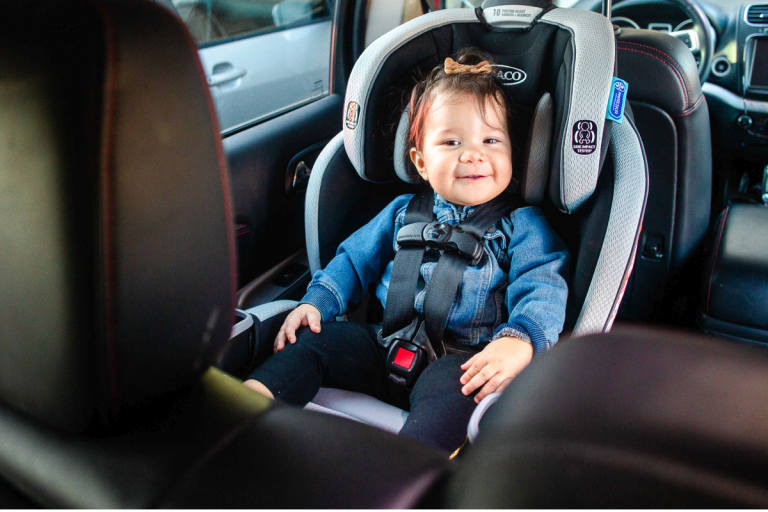 Proper car seat use is part of safe travel routines when using a portable monitor
Source: babylist.com
Proper car seat use is part of safe travel routines when using a portable monitor
Source: babylist.com
Step-by-Step Guide to a Safe, Effective Monitor Setup
Avoiding all common mistakes is easy with a simple, repeatable setup routine. Follow this checklist to eliminate risk and get the most out of your device:
- Mount cameras on a wall or ceiling at least 3 feet above the mattress, angled to show your baby’s torso and head, not just crib rails
- Secure all cords with wall channels or cord shorteners, keeping them at least 4 feet above the crib edge
- Change default passwords, enable two-factor authentication, and turn on end-to-end encryption for all Wi-Fi devices
- Test signal strength across every room you frequent, including outdoor spaces and upper/lower floors
- Set audio alerts as your primary overnight signal, and schedule monthly checks for firmware and app updates
- Use video selectively for daytime checks, and avoid scrolling live feeds overnight to protect your sleep
 Unsafe sleep positions are a top risk for infants, and monitors can help you spot them
Source: todaysparent.com
Unsafe sleep positions are a top risk for infants, and monitors can help you spot them
Source: todaysparent.com
Frequently Asked Questions
What is the most common baby monitor mistake parents make?
The most widespread error is relying on the monitor as a replacement for in-person checks, rather than a supplement. Many parents also leave default passwords unchanged, skip full-home signal testing, or place cameras too close to the crib, creating strangulation or fall hazards that are completely preventable.
Are Wi-Fi baby monitors safe for nurseries?
Wi-Fi monitors are safe if you use strong unique passwords, enable end-to-end encryption, and install firmware updates regularly. For shared networks or parents concerned about hacking, non-Wi-Fi audio or local-storage video monitors are lower-risk alternatives that don’t rely on cloud storage for footage.
How far should a baby monitor be from the crib?
The Consumer Product Safety Commission and American Academy of Pediatrics recommend keeping all monitor components at least 3 feet from the crib edge, with cords secured out of reach. Wall-mounted cameras should be placed at least 3 feet above the mattress surface to avoid fall and strangulation risks as babies grow into toddlers.
Should I use video or audio monitoring overnight?
Audio monitoring is generally better for overnight use, as it produces fewer false alerts and disrupts sleep less than constant video checking. Use video for daytime nap checks or if you need to confirm safe sleep positioning, but avoid scrolling live feeds at night to preserve your rest and reduce anxiety.
How often should I update my baby monitor's software?
Check for firmware and app updates at least once a month, and enable automatic updates if your device supports them. Updates patch security vulnerabilities that could allow unauthorized access, and fix bugs that cause false alarms, poor battery life, or signal drops that leave you without coverage when you need it most.
 In-person checks are still the most reliable way to confirm your baby is safe
Source: visla.com
In-person checks are still the most reliable way to confirm your baby is safe
Source: visla.com
Conclusion
Most baby monitor problems stem from simple, avoidable mistakes: poor placement, weak security, over-reliance on tech, and skipped signal testing. Correct setup and mindful use make monitoring work for you, not the other way around. Take time this weekend to spend 15 minutes testing your monitor’s signal across your home, updating its firmware, and securing its login credentials to eliminate the most common risks right away. For a full checklist of nursery safety steps to pair with your monitor setup, download our free 2026 Nursery Safety Guide to cover all potential hazards in one place.

Emma Grace is a devoted mother and passionate content writer at BestBabyCart.com. With firsthand parenting experience and a love for research, she creates helpful guides and honest reviews to support parents in choosing the best for their babies. Her goal is to make parenthood easier, one article at a time.