Whether your newborn is in the NICU or special care nursery, or your older infant/toddler is hospitalized for an illness or procedure, being able to read their monitor reduces anxiety and helps you advocate for their care. Hospital monitors function very differently from at-home baby monitors: clinical models track real-time vital signs used by care teams, while personal audio/video monitors are permitted only in select pediatric wards. This guide breaks down exactly what each signal, number, and sound means, with actionable steps to stay informed without unnecessary stress, aligned with current hospital parent education standards.
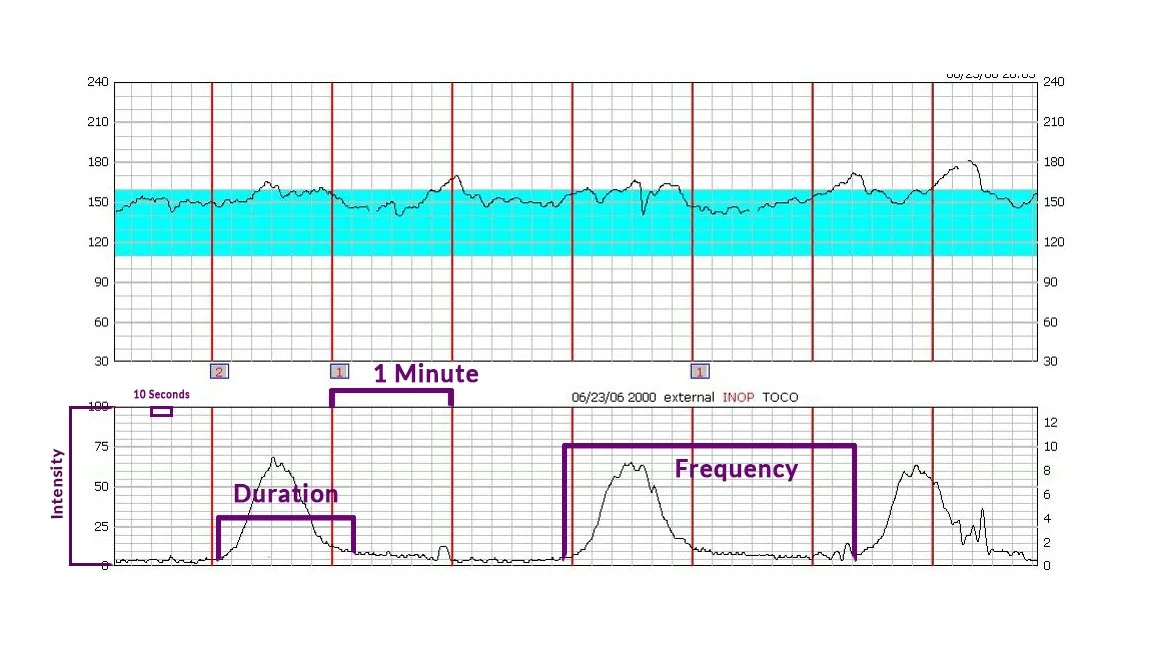 Clinical cardiotocography monitors are standard for tracking newborn vital signs in labor and delivery units.
Credit: birthandlifephotography.com
Clinical cardiotocography monitors are standard for tracking newborn vital signs in labor and delivery units.
Credit: birthandlifephotography.com
What Hospital Baby Monitors Actually Measure
Before you can interpret monitor data, it helps to understand what the device is tracking, as functions vary drastically depending on your child’s care setting.
Core Vital Signs Tracked in Clinical Settings
For newborns in NICUs or special care nursies, hospital-issued clinical monitors track four standard vital signs, with additional metrics added for babies with complex health needs:
- Heart rate (beats per minute, bpm)
- Respiratory rate (breaths per minute)
- Blood oxygen saturation (SpO2, percentage of oxygen in the blood)
- Body temperature Some units also track blood pressure, movement, or carbon dioxide levels for infants on ventilators. These monitors are pre-programmed with alert thresholds specific to your baby’s age, weight, and health status, set by their care team.
At-Home vs. Hospital Monitor Functions
At-home baby monitors only capture audio, video, and movement, with no clinical vital sign data. Hospital clinical monitors display real-time, medical-grade data that nurses and doctors use to make care decisions — you will not be able to adjust alert thresholds or calibration on these devices, as changes require technician approval to avoid safety risks. These monitoring standards are designed to flag early signs of distress, per CDC's NICU family engagement guidelines.
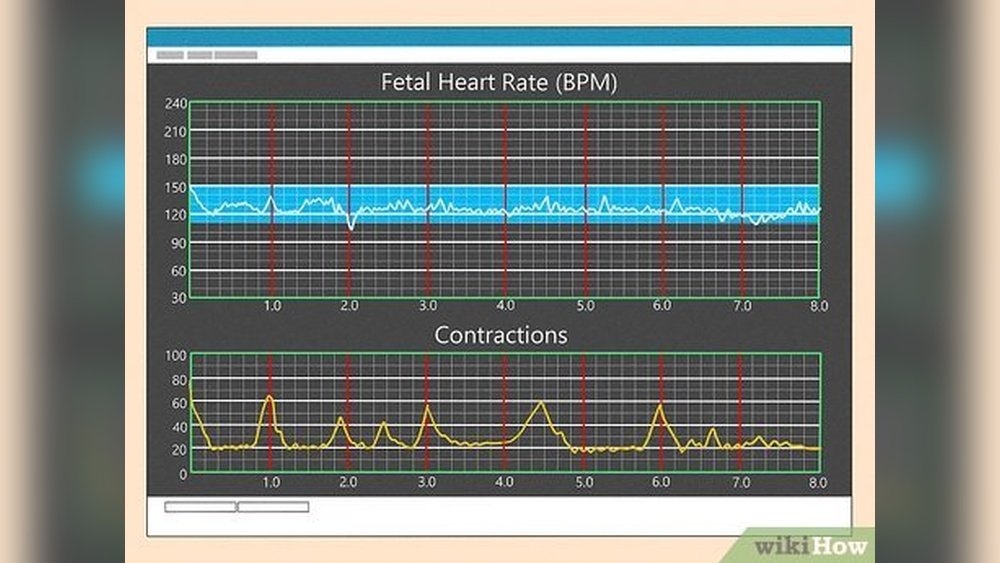
 A nurse walking parents through their baby's monitor readings is standard practice in most NICUs.
Credit: www.wikihow.com
A nurse walking parents through their baby's monitor readings is standard practice in most NICUs.
Credit: www.wikihow.com
How to Read Core Monitor Readings
Most parent anxiety around hospital monitors stems from not understanding what normal looks like for their specific baby, or misinterpreting routine alerts as emergencies.
Decoding Numerical Vital Sign Values
Normal ranges vary by age and health status, so always confirm your baby’s personalized thresholds with their nurse on admission. For reference, standard normal ranges for healthy term newborns are:
- Heart rate: 120–160 bpm
- Respiratory rate: 30–60 breaths per minute
- SpO2: 95–100% (on room air)
- Temperature: 97.7–99.5°F (36.5–37.5°C) For preterm infants, thresholds are often adjusted to account for immature lungs and heart function, so a reading that would trigger an alert for a term baby may be normal for your preemie.
Understanding Alarm Sounds and Visual Cues
Hospitals use a standardized alarm hierarchy to help parents and staff quickly identify the urgency of an alert:
- Advisory alerts: Soft, brief chimes, yellow flashing lights. These are almost always self-resolving, caused by temporary issues like the baby shifting off a sensor, a loose wire, or a 1-2 second dip in oxygen that corrects on its own. A common mistake new parents make is rushing the nurse for every advisory alert, which disrupts care for other patients.
- Critical alerts: Loud, sustained sirens, red flashing lights. These signal readings outside your baby’s set safety thresholds, such as a heart rate below 100 bpm for a term newborn, or an apnea event (pause in breathing longer than 20 seconds). These require immediate staff response.
 The upper tracings show fetal or newborn heart rate, while the lower tracings track uterine contractions or movement.
Credit: en.wikipedia.org
The upper tracings show fetal or newborn heart rate, while the lower tracings track uterine contractions or movement.
Credit: en.wikipedia.org
Rules for Using Personal Baby Monitors in Pediatric Hospital Wards
For older hospitalized infants and toddlers (not in NICU or special care), most units allow personal audio/video monitors for non-clinical use, but strict rules apply to avoid interference with medical equipment and protect patient privacy.
Permitted Use Cases and Prohibited Zones
Personal monitors are strictly prohibited in all NICU and special care nursery settings, as their wireless signals can interfere with life-support equipment, and loose cords pose a strangulation and infection risk. They are permitted in most general pediatric wards, with approval from your care team.
Key Features for Hospital-Safe Personal Monitors
When selecting a monitor for a pediatric stay, prioritize:
- Dual-band (2.4GHz and 5GHz) connectivity to avoid lag from crowded hospital Wi-Fi
- AES-256 or higher encryption to protect your family’s privacy
- A physical power switch (no touch-only controls, easier for tired parents to use quickly)
- No required cloud recording or sharing features, to comply with hospital privacy policies
Hospital Network Compatibility
Most hospitals use captive portal Wi-Fi, which requires you to log in with a guest pass each time you connect. Avoid monitors that require a constant internet connection for local viewing, as you may lose access if the network goes down. Opt for a model with a dedicated radio frequency (RF) parent unit that works independently of hospital Wi-Fi.
Setting Up Your Monitor Correctly
Proper setup reduces false alerts and ensures you can see and hear your child clearly without disrupting other patients.
Clinical Monitor Adjustments
You will not set up clinical NICU monitors yourself, but you can ask the nurse to:
- Adjust the screen angle to match your recliner or chair height for easy viewing
- Enable audio alerts for your baby’s specific thresholds, if the unit supports it
- Walk you through the location of the nurse call button near your station
Personal Monitor Positioning and Safety
For personal monitors in pediatric wards:
- Place the camera at a slight downward angle to get a full view of the crib, mounted on a stable stand or wall at least 3 feet from the crib to avoid suffocation hazards
- Keep all cords out of reach of your child, and tuck excess cord length away to avoid tripping hazards
- Avoid placing the camera near windows or overhead lights to reduce glare on the screen
Optimizing Settings for Hospital Use
- Turn off push notifications for the monitor app, as you do not need phone alerts when you are in the same building as your child
- Set the volume to a level that lets you hear alerts without disturbing other patients in shared wards
- Disable cloud recording and remote sharing features to protect your child’s privacy
Interpreting Alerts: Action Steps for Every Scenario
Knowing how to respond to different alerts reduces stress and ensures your child gets timely care when needed.
Routine, Self-Resolving Alerts
For brief soft chimes or yellow flashing lights that resolve within 10-15 seconds:
- Glance at the monitor to confirm the reading has returned to normal
- Note the time of the alert to share with the nurse during shift checks if it repeats
- Do not call the nurse unless the alert happens more than 3 times in an hour, or is accompanied by visible changes in your child’s behavior
Critical Alerts Requiring Immediate Response
For loud, sustained alarms or red flashing lights:
- Press the nurse call button immediately
- Stay calm and state the exact alert clearly (e.g., “The heart rate alarm is going off, it’s showing 72 bpm”)
- Do not touch the monitor or sensors unless instructed by staff, as improper handling can cause further errors
Resolving Repeated False Alerts
If you get repeated alerts with no obvious cause:
- For clinical monitors: Ask the nurse to check that sensor pads are flat against the skin with no air bubbles, and that cords are not pulled tight
- For personal monitors: Lower the motion sensitivity setting to avoid alerts from normal baby movements, and wipe the camera lens to remove dust or smudges that may trigger motion alerts
Keeping Your Monitor Accurate and Secure
Proper maintenance ensures you get reliable readings, and protects your family’s sensitive health information.
Maintaining Clinical Monitor Accuracy
While hospital technicians calibrate clinical monitors daily, you can do quick checks to ensure accuracy:
- Confirm sensor pads are fully adhered to the skin, with no loose edges
- Check that the monitor is showing a steady, smooth waveform for heart rate, rather than a jagged, flat line
- Report any glitching or inconsistent readings to the nurse immediately
Personal Monitor Care and Power Management
- Keep the parent unit and camera fully charged at all times, and bring a portable power bank as a backup, as hospital rooms have limited outlets
- Replace rechargeable batteries every 6 months even if they still hold a charge, to avoid unexpected shutdowns during the night
- Clean the camera lens with a soft, dry cloth only — no cleaning sprays or wipes, per hospital infection control rules
Protecting Your Family's Privacy
- Use a unique, complex password for any monitor accounts, and change the default password immediately after setup
- Disable all cloud storage, remote access, and sharing features for personal monitors
- Never share monitor footage on social media without explicit written consent from your care team, to comply with HIPAA privacy rules
Troubleshooting Common Monitor Issues
Signal Drop or Lag
If your personal monitor’s video freezes or audio cuts out:
- Move the parent unit closer to the camera, and avoid placing either device near metal objects like IV poles or hospital bed frames that block signal
- Switch the monitor to its dedicated RF channel instead of Wi-Fi, if the model supports it
- Ask hospital staff if there is a known Wi-Fi congestion issue in your unit, and adjust your position accordingly
Blurry Video or Muffled Audio
- Wipe the camera lens with a soft, dry cloth to remove smudges or dust
- Adjust the camera angle to avoid glare from overhead lights or windows
- Check that the microphone port on the camera is not blocked by a blanket, crib bumper, or wall
Persistent False Alarms
If alerts continue after adjusting settings, ask the nurse to check if the monitor’s thresholds need to be tweaked for your child’s current condition, or if there is a technical issue with the device.
Frequently Asked Questions
Can I adjust the settings on a hospital clinical baby monitor?
No. Clinical monitors are pre-programmed with alert thresholds set by your baby’s care team based on their specific health needs. Adjusting settings yourself could lead to missed alerts or unnecessary alarms, so only licensed technicians and nurses can modify these settings.
Do hospital baby monitors record audio or video?
Most clinical NICU monitors do not record continuous audio or video for privacy reasons, though some units allow parents to request time-limited, staff-approved recording for personal use. Personal monitors you bring should have recording disabled in shared wards to protect other patients’ privacy.
What should I do if I don’t understand an alert?
Ask your care team for a full walkthrough of the monitor’s alerts and readings on your first day in the unit. Most hospitals have printed guides specific to their monitor models, and nurses are trained to explain what each sound and number means as part of standard parent education.
Are hospital baby monitors safe for newborns?
Yes. Clinical monitors are tested to meet strict electromagnetic safety standards, and emit radiation levels far below thresholds that could cause harm. Personal monitors you bring should be certified by a recognized safety body like UL, and placed at least 3 feet from the crib to eliminate any risk.
Final Tips for Stress-Free Monitoring
Watching your child through a hospital monitor can feel overwhelming, but small habits make the experience far more manageable:
- Avoid constant monitoring: Rely on the monitor’s alarm system instead of staring at the screen 24/7, and take short breaks to rest your eyes and get fresh air
- Prioritize clear communication: Ask your care team to clarify any alerts or readings you don’t understand, and share any concerns you have about your child’s behavior or monitor accuracy
- Pack familiar items to make the space feel calmer: Many units allow small, calming decor items to make the hospital room feel less clinical for your family. Dress your baby in appropriate baby layers to avoid false temperature alerts from the monitor, and bring comfort items for the crib (check policy first) to help them settle. If your baby is old enough for solids, pack their usual feeding dishes to reduce stress during mealtimes. Just like balancing rest with care for a baby with an early bedtime at home, adjusting your routine is critical to avoiding burnout during long hospital stays.
Conclusion
Reading a hospital baby monitor is a simple skill that can drastically reduce your stress and help you feel more connected to your child during their stay. The most important step is to ask your care team for a full walkthrough of the monitor’s specific alerts and your baby’s personalized thresholds on your first day — most false alarms are routine and self-resolving, and care teams are happy to clarify what you’re seeing. Trust the technology, communicate openly with your nurses, and remember that the monitor is a tool to support your care team, not a replacement for their expertise. For more guidance on navigating hospital stays with your baby, browse our full library of parent resources.

Emma Grace is a devoted mother and passionate content writer at BestBabyCart.com. With firsthand parenting experience and a love for research, she creates helpful guides and honest reviews to support parents in choosing the best for their babies. Her goal is to make parenthood easier, one article at a time.